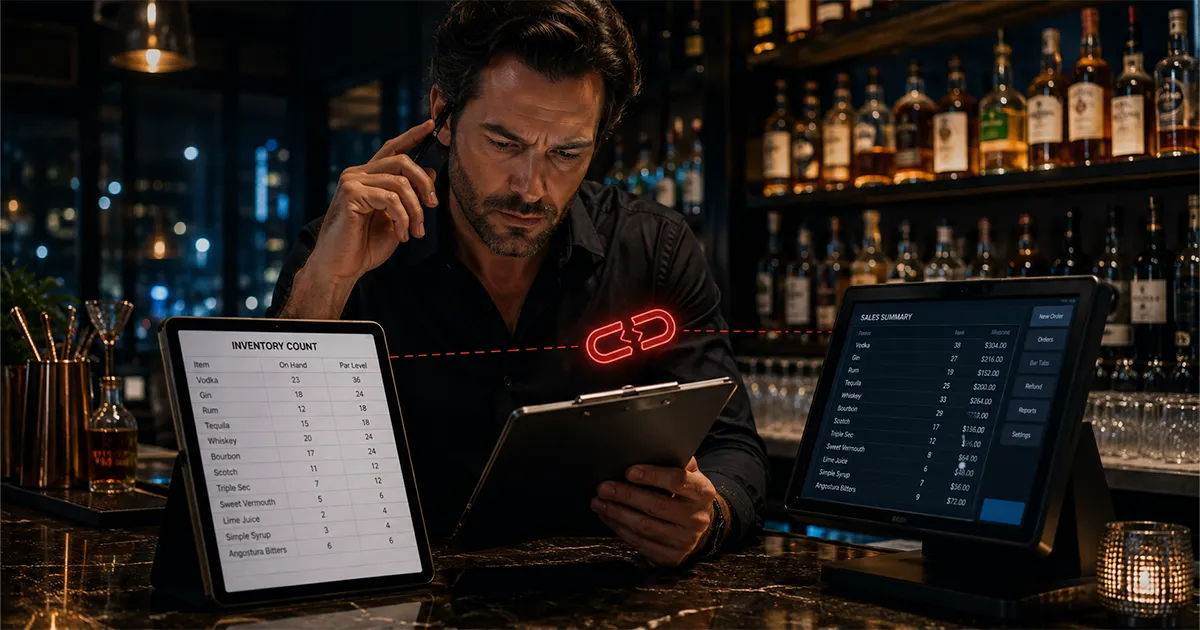
If you are evaluating Partender for your bar, one of the first things you will notice is that the product does not list any POS integrations. No Toast connection, no Square sync, no Clover link. That is not an oversight or a feature on a roadmap. It is a fundamental part of how Partender is designed. And depending on what you need from inventory software, it may be the most important thing to know before you sign up.
This article explains what POS integration actually does for bar inventory tracking, why the absence of it limits what Partender can tell you, and what that gap costs in real dollars when you are trying to catch over-pouring and shrinkage at your bar.
The POS side of this comparison is easy to verify through POS documentation. Toast's Product Mix report guide documents menu-level and item-level sales reporting, and Clover's restaurant POS overview describes menu management, reporting, and inventory management as POS capabilities.
What POS Integration Actually Does for Inventory Tracking
Bar inventory software that integrates with your POS does one thing that manual systems cannot: it automatically imports your sales data every count cycle. That means when you finish counting bottles on a Monday morning, the software already knows exactly how many of each item you should have sold since your last count, based on what the POS recorded as rung up and paid for.
With that sales data in hand, the software can run the core calculation of bar loss prevention: expected usage versus actual usage. Expected usage is calculated from your opening inventory, plus any purchases received, minus the closing count. Actual usage is the sales data from your POS, what was theoretically poured based on what customers paid for. When expected usage is significantly higher than what the POS says should have been used, something is wrong. Product went out without being rung up. That is where theft, over-pouring, and untracked waste live.
Without POS integration, that comparison is either impossible or imprecise. You can import a sales report manually, if your system even exports the data in a usable format, but you are adding a step that introduces errors and almost no bar owner actually does consistently. The result is that your variance is a broad approximation, not an accurate gap between pour and sale.
How Partender Handles Variance Without POS Integration
Partender's core value proposition is counting speed. The app lets you photograph bottle levels or tap bottle silhouettes to log quantities, which is faster than traditional weight-based or manual entry counting. That part works well, and it is a real advantage for bars that struggle with the time their weekly count takes.
After the count, Partender generates a "Smart Order" based on your par levels, which helps you know what to reorder. What it does not do is automatically compare your count data against what your POS says you sold. That comparison has to happen manually, which means exporting your POS sales report, matching category totals against Partender's categories, and doing the math yourself in a spreadsheet. Most bar owners do not do this consistently, which means the variance analysis that justifies the cost of the software never actually happens.
The Difference Between Category-Level and Item-Level Variance
Because Partender does not connect to your POS, its variance reporting stops at the category level. You might see that your spirits category used $1,200 worth of product but only generated $900 in sales, a $300 gap. That is useful to know. But it does not tell you which bottle is disappearing, which shifts have the highest loss rate, or which bartender is working when the variance spikes.
Item-level variance, by contrast, tells you that your Patron Silver specifically is showing a 2.3-bottle discrepancy over the last count cycle, that this has happened three of the last four weeks, and that the variance is concentrated on Friday and Saturday nights. That information has a name attached to it, whichever bartender works those shifts. That information is actionable. A category-level gap is not.
The difference between those two levels of detail is POS integration. Without knowing what the POS actually recorded as sold, you cannot run the item-level math. You can only compare your count this week to your count last week and call the difference variance, which conflates theft, over-pouring, counting errors, and legitimate spillage into one undifferentiated number.
What the Gap Actually Costs
The average bar loses approximately $21,000 per year to shrinkage, over-pouring, theft, untracked waste, and receiving errors combined. The question is not whether loss is happening at your bar. It is whether you can identify it specifically enough to stop it.
A category-level variance report tells you the loss is real. It gives you no leverage to fix it. You cannot schedule a difficult conversation with a bartender based on a category gap. You cannot adjust a recipe, retrain on pour size, or change purchasing behavior based on a $400 spirits shortfall that could be attributed to any of ten causes across any of thirty products.
Item-level variance with POS-backed data does give you that leverage. When three count cycles in a row show the same bottle short on the same two shifts, you have a documented pattern, not a suspicion. That documentation is what separates a productive conversation from an accusation, and a targeted fix from a blanket policy that misses the actual problem.
Shift-Level Accountability: The Gap Partender Cannot Close
Shift-level variance is the most practically useful output of bar inventory software that has POS integration. Instead of comparing weekly totals, you compare usage during each shift against sales recorded on that shift by the POS. That tells you not just what was lost but when, and by extension, who was working.
Partender does not produce shift-level variance data. Because there is no POS connection, there is no shift-level sales data to compare against. Your weekly count gives you a single aggregate number per category, and that is the floor of the analysis, not a starting point for going deeper.
For bars that are primarily trying to know whether they are running out of stock and what to reorder, this limitation may not matter. For bars that have a real concern about loss, over-pouring, theft, and untracked waste, shift-level accountability is not optional. It is the difference between knowing something is wrong and being able to prove it.
What to Use Instead of Partender if POS Integration Matters
If your bar uses Toast, Square, Clover, or Focus POS, bar inventory software with a native POS integration is available at prices comparable to or lower than Partender. BarGuard, for example, connects directly to all four of those systems. When a count is complete, the software pulls your sales data automatically and generates a variance report that shows expected usage versus actual usage by item, by shift, and by date, no manual export or spreadsheet math required.
BarGuard also includes AI invoice scanning, which means when a delivery arrives you photograph the invoice rather than entering quantities by hand. The system matches invoice items to your inventory, flags discrepancies between what you ordered and what you received, and logs the purchase automatically. Partender's equivalent is a spreadsheet-based "Smart Order" that requires manual purchase entry.
For a full side-by-side comparison of features and pricing, see the BarGuard vs Partender comparison page. The short version: Partender is priced at $299/month for its Pro plan. BarGuard includes POS integration, AI invoice scanning, and item-level variance reporting starting on the Essential plan at $129/month.
Is Partender Ever the Right Choice?
There are situations where Partender makes sense. If your bar is cash-only and does not use a POS system at all, there is no POS data to integrate, and Partender's fast counting interface is a genuine improvement over a clipboard and pen. If you run a very small operation where category-level loss awareness is enough to manage the business, the complexity of item-level variance may be more than you need.
But if you have a POS, use it actively, and want to understand your losses well enough to act on them, not just know they exist, you need a system that connects to your sales data. That is not a feature Partender offers, and it is not something you can work around with manual exports without defeating the purpose of automated inventory software.
The question to ask is: what do you actually need to learn from inventory software? If the answer is "counting speed and reorder suggestions," Partender covers that. If the answer is "proof of what is being lost, where, and when," you need a system that can run the variance math against real sales data.
BarGuard Catches What You Can't See
Connect your POS, count your inventory, and let BarGuard show you exactly where the gaps are, automatically, every week.