Bar Inventory Software
That Shows You Where the Money Went
BarGuard connects your POS and your invoices, lets you count on a phone, and tells you what disappeared between the two, by bottle and by shift. It keeps running between counts, so the loss has a number instead of a hunch. Free 30 day trial, card required.
Manual inventory tracking is costing you thousands
Spreadsheets, clipboards, and gut feel guesses don't catch a bartender free pouring for friends. They don't flag when your well vodka usage runs well over what the sales say. They don't connect your purchase costs to your actual sales, so you never know your real pour cost.
Over pouring
A little extra in every glass never lands on a count sheet, but it drains the bottle faster than sales explain.
Shrinkage and theft
Free drinks, walk outs, and employee theft rarely show up in manual counts.
Inventory errors
Mismatched count sheets hide losses for weeks before anyone notices.
BarGuard connects the dots between inventory and sales
Instead of just counting bottles, BarGuard compares what you should have used against what you actually used, and flags every discrepancy.
POS Integration
Connect Square, Toast, Clover, or Focus POS. Sales sync automatically, no manual entry.
Variance Calculations
Run shift based or date range variance reports in one click. See exactly which items are over poured or missing.
AI Invoice Scanning
Photograph your invoices. AI extracts line items, matches them to inventory, and logs your purchases.
Stock Level Tracking
Always know what's on hand. Count by category, filter by type, and get reorder alerts before you run out.
AI Variance Summaries
After each calculation, BarGuard's AI writes a plain English summary of your highest risk items.
Shift Based Analysis
Compare Happy Hour against Dinner against Late Night. Pinpoint exactly which staff or shift is driving losses.
From setup to your first variance report
No consultant. No training. Just log in and start tracking.
Add your inventory items
Import via CSV or add manually. Set units, categories, and costs. BarGuard auto categorizes with AI.
Connect your POS
Link Square, Toast, Clover, or Focus POS. Your sales data syncs automatically, every 5 minutes.
Count your stock
Use the Count Now screen on any device. Enter quantities by category.
Run variance calculations
Select your date range or shift. Click Run. BarGuard compares expected vs actual usage instantly.
Find the loss, fix the problem
See your critical and warning items. Get an AI summary. Take action, adjust pours, have conversations, fix reorders.
See it before you trust it
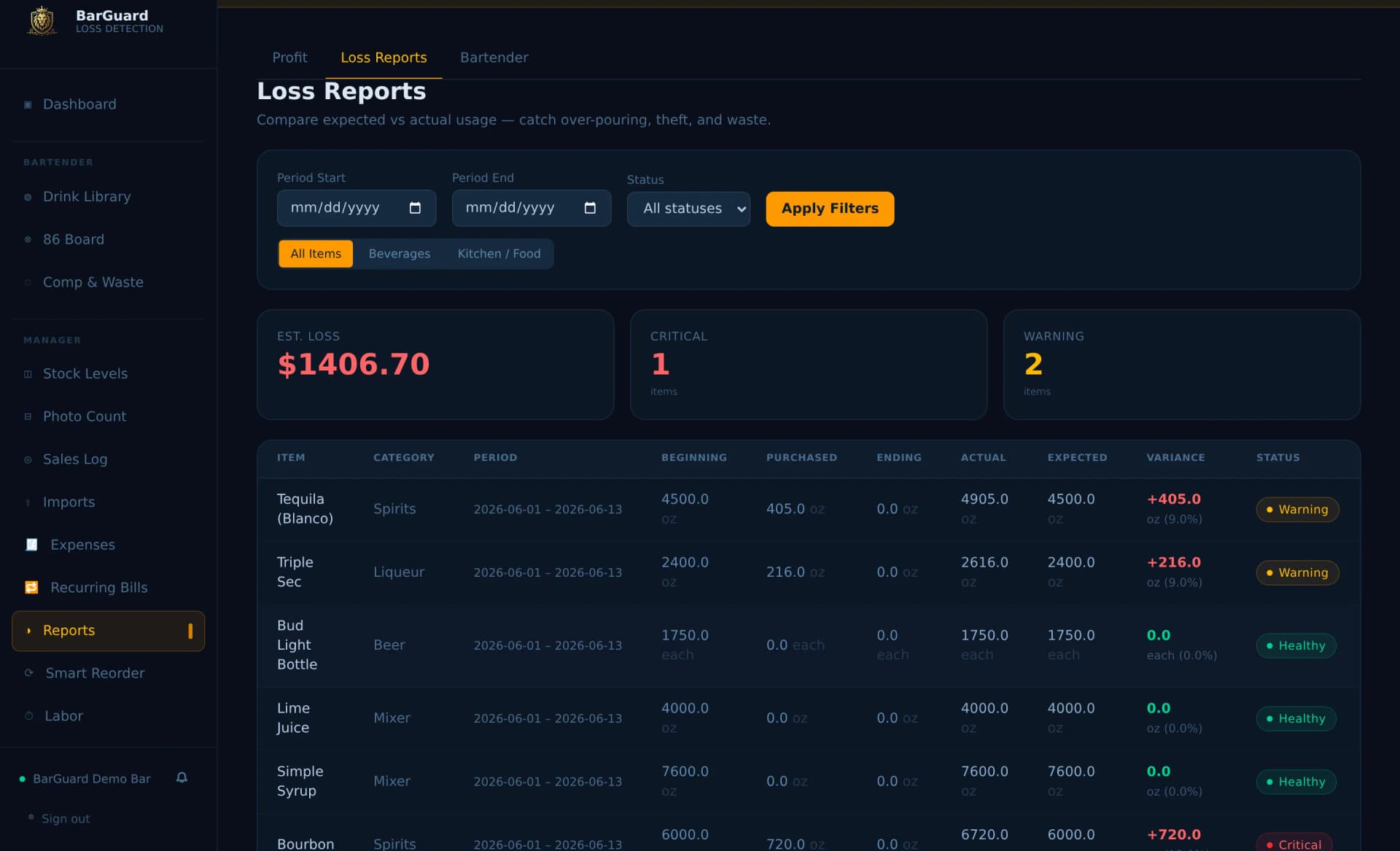
This is the report you run after a shift. Every bottle compared, expected against actual, each one flagged critical or warning with a dollar estimate of the loss.
Related Resources
Evaluating your options?
No need to change your setup. BarGuard connects directly with Square, Clover, Toast, and Focus POS.
More integrations coming soon.

"I always knew something was off after busy weekends. BarGuard showed me exactly which bottles, which shifts. Changed how I run the whole operation."

Eddie M.
Owner, The Mason Jar, Greer, S.C.
As Featured On



Common questions
What does bar inventory software do?
It connects your POS sales and your purchase invoices to your physical counts, then shows what you should have used against what you actually used. BarGuard flags the gap by item and by shift, so you see where product and money are leaving.
How is BarGuard different from the inventory built into my POS?
A POS tells you what rang up. It cannot tell you what was poured heavy, comped, spilled, or walked out without a sale. BarGuard compares expected usage against your real counts, so it catches the loss your POS never records.
How long does setup take?
Add your items or import a CSV, connect your POS, and do a count. Your next count, with real sales in between, gives you your first variance report.
Which POS systems does BarGuard work with?
BarGuard connects to Square, Toast, Clover, and Focus POS. Sales sync automatically so you never enter them by hand.
How much does bar inventory software cost?
BarGuard starts at $129 per month with a free 30 day trial. There are no setup fees and you can cancel anytime. A card is required to start, and you are not charged until day 30.
Ready to see where the money went?
Start a free trial, connect your POS, and run your first count.
30 day free trial · Card required · No setup fees · Cancel anytime before day 30