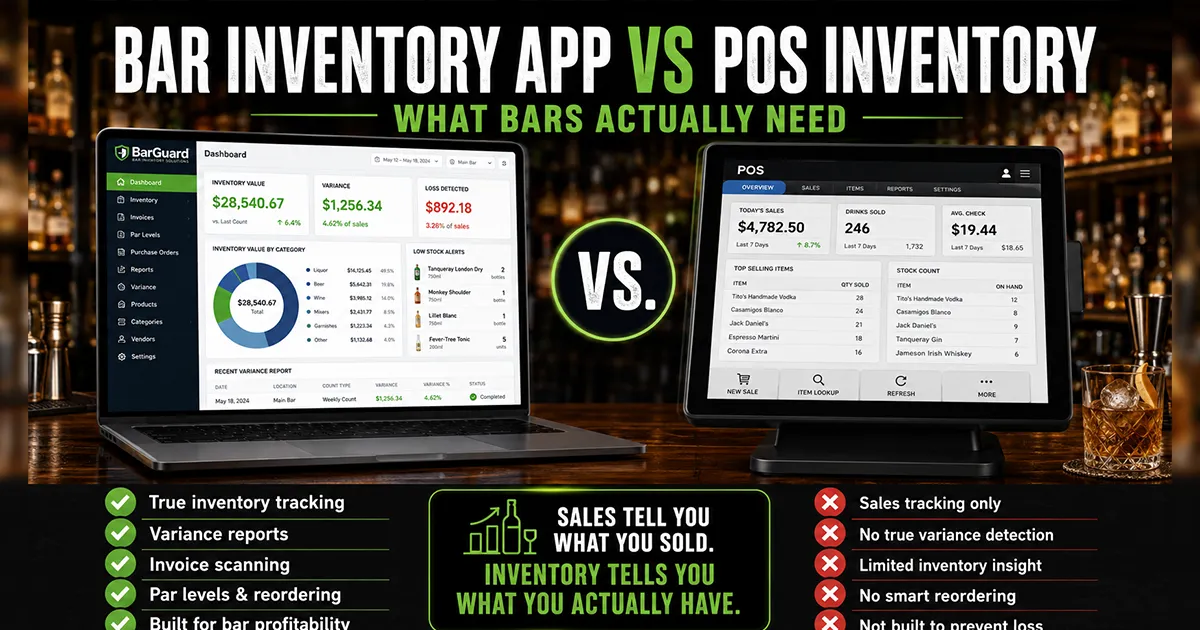
A POS system is one of the most important tools in a bar. It rings sales, tracks checks, manages menus, records comps and voids, and gives owners a clear picture of revenue. Many POS systems also include some kind of inventory feature, which leads to a reasonable question: if your POS already has inventory, do you still need a separate bar inventory app? Once you have settled that, our guide to the best bar inventory management software compares the main options side by side.
The honest answer is: sometimes yes, sometimes no. POS inventory can be enough for simple stock tracking. But a working bar has a deeper problem than "how many bottles are listed in the system?" Bars need to know whether product usage matched what was sold. That requires inventory counts, purchases, recipes, POS sales, waste, comps, and variance reporting to work together.
POS systems are strongest when they provide clean sales and menu reporting. For example, Toast documents Product Mix reporting, while Clover's restaurant POS overview describes menu management and reporting as core POS functions.
The Short Version
POS inventory is usually best for menu items, retail-style stock, simple quantity tracking, and sales reporting. A bar inventory app is best for physical counts, partial bottles, purchasing, recipe depletion, expected usage, actual usage, and variance. Your POS tells you what guests bought. A bar inventory app tells you whether the product used to make those sales actually lines up. Neither tool replaces the bar inventory management process. They change how much of it stays manual.
If you run a simple beer-and-shot bar, your POS inventory tools may be enough for a while. If you sell cocktails, track liquor bottles, manage multiple bartenders, deal with partial pours, or suspect over-pouring and theft, POS inventory alone usually leaves too many gaps.
What POS Inventory Usually Does Well
POS inventory tools are strongest when inventory behaves like retail stock. If you sell one packaged item and one unit leaves inventory, the math is straightforward. A canned beer, bottled soda, retail bottle, or merchandise item is easy for a POS to decrement when sold. This kind of inventory tracking is useful, especially for low-complexity categories.
Many POS systems can also help with menu management, item categories, modifier sales, stock alerts, basic reporting, and sales history. That is valuable because sales data is the starting point for inventory control. Without clean POS sales, you cannot calculate what should have been used.
- ▸Tracks menu items and sales by category.
- ▸Records comps, voids, discounts, checks, and employee activity.
- ▸Can reduce stock levels when simple items are sold.
- ▸Shows sales volume for each drink, beer, wine, or product.
- ▸Helps owners understand revenue, not just inventory value.
For a small bar with mostly packaged products, that may cover a lot of the day-to-day need. The limitation appears when one POS sale uses several ingredients, partial bottles, changing recipes, modifiers, waste, or staff behavior that does not show up cleanly in the sales report.
Where POS Inventory Breaks Down for Bars
Bars are not retail shelves. A cocktail sale can consume tequila, triple sec, lime juice, agave, salt, and garnish. A rocks pour may use a different amount than a neat pour. A double should use twice as much spirit and be rung correctly. A batch may use several bottles before the first drink is sold. A bartender may over-pour a quarter ounce all night without the POS knowing it happened.
That is the core problem. POS inventory often starts from the transaction. Bar inventory control has to start from the physical product. You need to know what came in, what was counted, what sold, what should have been used, and what actually disappeared. POS data is one part of that system, not the whole system.
- ▸Partial bottles are hard to track accurately from POS sales alone.
- ▸Cocktail recipes require ingredient-level depletion, not just item-level sales.
- ▸Comps, waste, spills, and shift drinks need clean operational controls.
- ▸Bottle sizes, cases, kegs, and ounces need unit conversions that POS stock tools may not handle deeply.
- ▸Over-pouring and theft can look like normal sales unless actual usage is compared against expected usage.
What a Bar Inventory App Adds
A bar inventory app adds the physical and operational side of the equation. It helps the team count inventory, enter purchases, track bottle levels, map recipes, connect POS sales, and calculate variance. The best systems do not replace the POS. They use POS sales data as the sales truth, then compare that truth against inventory movement.
That comparison is where loss becomes visible. If the POS says you sold enough margaritas to use 2.5 bottles of tequila, but your count shows 3.5 bottles gone after purchases are accounted for, you have a one-bottle gap. That gap may be over-pouring, theft, waste, bad recipe mapping, missed comps, or a count issue. But now you know where to investigate.
- 1Inventory counts show what is physically on hand.
- 2Purchases show what came into the building.
- 3Recipes show what each sale should consume.
- 4POS sales show what guests actually bought.
- 5Variance shows the gap between expected usage and actual usage.
That is why a dedicated bar inventory app becomes important once the owner needs answers, not just stock numbers.
The Key Difference: Stock Tracking vs Variance Tracking
Stock tracking answers a simple question: how much product do we think we have? Variance tracking answers a more valuable question: did the product used match what the bar sold? The second question is where shrinkage, over-pouring, theft, waste, missed purchases, and bad recipes show up.
A POS may tell you that 120 margaritas were sold. A bar inventory app should tell you how much tequila those margaritas should have used, how much tequila actually left inventory, and what the difference costs. That is the difference between inventory as a list and inventory as a profit-control system.
- ▸Stock tracking helps you reorder.
- ▸Variance tracking helps you stop loss.
- ▸Stock tracking is useful for availability.
- ▸Variance tracking is useful for accountability.
- ▸Stock tracking tells managers what is low.
- ▸Variance tracking tells owners what is disappearing.
When POS Inventory Is Enough
POS inventory can be enough when the bar is simple, sales are mostly one-to-one with products, and the owner does not need deep variance reporting yet. If you sell mostly packaged beer, canned cocktails, bottled wine, and simple pours, POS stock tracking may cover basic reorder and availability needs.
It can also be enough during the earliest stage of operations when the priority is getting items, menus, modifiers, and sales reporting under control. A new bar should not overcomplicate inventory before the team can ring sales correctly and count consistently. Clean POS data is still foundational.
- ▸You have one location and a short product list.
- ▸Most products are sold as whole units.
- ▸Cocktail volume is low or recipes are very simple.
- ▸The owner or one trusted manager handles counts personally.
- ▸You mainly need reorder reminders, not loss detection.
If that describes your bar, start simple. Use the POS tools you already have, or pair them with a bar inventory spreadsheet template until the workflow proves it needs more power.
When You Need a Separate Bar Inventory App
You need a separate bar inventory app when the expensive questions are no longer answered by the POS. If pour cost is high, premium bottles are short, comps are messy, or managers cannot explain the gap between sales and counts, the POS alone is not enough. You need the inventory system to compare physical usage against theoretical usage.
The need becomes stronger as complexity grows. More bartenders means more variation in pours. More cocktails means more recipe depletion. More locations means more permissions and oversight. More invoices means more opportunities for purchase data to lag behind counts. At that point, the POS can still be excellent at sales, but inventory needs its own layer.
- 1You suspect over-pouring but cannot prove which item or shift causes it.
- 2You count bottles weekly but still do not know where shrinkage happens.
- 3Cocktails use multiple ingredients and modifiers that need recipe-level depletion.
- 4Purchases, emergency buys, and credits are not reconciled before counts.
- 5Managers spend hours exporting POS reports and manually calculating usage.
- 6You need variance sorted by dollar impact so the team investigates the right items first.
If two or more of those are true, pricing a dedicated system is usually worth it. The guide to bar inventory software pricing explains how to judge cost against recoverable loss.
Why POS Integration Still Matters
A bar inventory app should not ignore the POS. The POS is still the best record of what sold. The problem is relying on POS inventory alone, not using POS data. A strong bar inventory system connects to the POS so expected usage can be calculated from real sales instead of manually copied reports.
That connection saves time and reduces mistakes. If managers have to export sales, copy drink counts, look up recipes, multiply ounces, convert bottle units, and paste everything into a spreadsheet, the comparison will either take too long or get skipped. POS integration keeps the sales side of the equation current.
- ▸POS sales create expected usage when recipes are mapped correctly.
- ▸POS comps and voids help explain product movement that did not create normal revenue.
- ▸POS employee and shift data can help narrow variance patterns.
- ▸POS menu changes need to stay aligned with recipe and inventory mappings.
This is why BarGuard connects with systems like Square, Clover, Toast, Lightspeed, and Focus POS. The POS handles sales. BarGuard uses those sales to show whether inventory usage makes sense.
Example: Margarita Sales vs Tequila Usage
Imagine your POS shows 140 house margaritas sold in a week. The recipe uses 2 ounces of tequila. That means expected tequila usage for margaritas is 280 ounces, or about 11 standard 750ml bottles. If tequila is also used in other drinks, the inventory app adds those recipes too. At the end of the count period, actual usage should be close to expected usage after purchases and opening inventory are accounted for.
If the count shows 14 bottles gone when recipes and sales expected 12, the POS did its job by recording the sales. But POS inventory alone may not tell you why two extra bottles disappeared. A bar inventory app turns that into a variance investigation: was the recipe wrong, were doubles rung correctly, did bartenders over-pour, were there unrecorded comps, or was a purchase entered late?
What Bars Should Not Expect From a POS
A POS should not be expected to solve every inventory control problem by itself. That is not a criticism of POS systems. It is a recognition that sales systems and inventory loss systems have different jobs. A POS is built around transactions. Bar shrinkage often happens outside clean transactions.
A bartender can pour heavy and still ring the drink correctly. A bottle can break and never be logged. A manager can comp drinks without consistent reason codes. A recipe can be outdated. A case can arrive and sit unentered until after the count. A POS can hold some of that information, but it usually does not turn it into item-level variance without a dedicated inventory workflow.
- ▸Do not expect POS inventory to catch every over-pour.
- ▸Do not expect menu sales alone to reveal missing bottles.
- ▸Do not expect basic stock alerts to replace variance review.
- ▸Do not expect item-level sales to equal ingredient-level depletion unless recipes are mapped.
- ▸Do not expect a POS to fix messy count timing, purchase entry, or staff controls.
How to Decide What Your Bar Needs
Start with the problem you are trying to solve. If the problem is stockouts, basic POS inventory or reorder alerts may help. If the problem is slow counts, a counting app may help. If the problem is unexplained loss, you need variance tracking. If the problem is rising liquor cost, you need to know whether the cause is pricing, recipes, waste, over-pouring, theft, or purchasing.
- 1List the top inventory problem you want solved.
- 2Decide whether that problem is about availability, counting speed, or loss detection.
- 3Check whether your POS can answer the question without manual spreadsheet work.
- 4If the answer requires expected-vs-actual usage, evaluate a bar inventory app.
- 5If the monthly loss is larger than the software cost, treat the app as a profit-control investment.
This decision should be practical, not emotional. Many bars can start with the POS and a spreadsheet. Many bars outgrow that once the owner wants proof instead of guesses. The goal is to choose the simplest workflow that gives managers numbers they can act on every week.
POS Add-On vs Dedicated Bar Inventory App
Some bars try to solve the gap with a POS add-on, and that can work when the add-on is built for the same level of inventory control the bar needs. The key is to judge the workflow, not the label. If the add-on can handle counts, purchases, recipes, expected usage, actual usage, and variance, it may be enough. If it mostly adds stock fields and reorder alerts, it may still leave the owner doing the real loss analysis manually.
A dedicated bar inventory app usually goes deeper on the beverage-specific details: partial bottles, bottle sizes, recipe ounces, keg handling, vendor cost changes, invoice scanning, count timing, and variance by item. That focus matters because bars lose margin in small operational gaps. A tool built for general POS inventory may not make those gaps obvious enough.
- ▸Choose a POS add-on if it gives your team one clean workflow and truly calculates variance.
- ▸Choose a dedicated app if the POS add-on still requires spreadsheet math after every count.
- ▸Choose the system managers will review weekly, not the one with the longest feature list.
- ▸Choose the system that identifies dollar impact, because managers should investigate the expensive gaps first.
Where BarGuard Fits
BarGuard is designed to sit beside the POS, not replace it. The POS remains the source for sales. BarGuard connects that sales data with counts, purchase scanning, recipes, stock levels, and variance reports. The result is a clearer view of what should have been used, what was actually used, and what the difference costs.
That matters because most owners do not need another disconnected dashboard. They need the missing layer between sales and inventory loss. BarGuard helps identify over-pouring, shrinkage, theft patterns, waste, purchase timing issues, and recipe mismatches while keeping the weekly workflow focused on the items with the biggest dollar impact.
- ▸Use your POS for sales, checks, menus, comps, and revenue reporting.
- ▸Use BarGuard for counts, purchases, expected usage, actual usage, and variance.
- ▸Use the combined data to review the bottles, shifts, and recipes that affect profit most.
If you want the feature view, start with the bar inventory software page. If you are comparing cost, read the bar inventory software pricing guide. If you want to understand the math behind the gap, read the guide to bar inventory variance.
Bottom Line
POS inventory is useful, but it is not the same as bar inventory loss detection. If your bar needs basic stock tracking, the POS may be enough. If your bar needs to explain missing product, high pour cost, over-pouring, or shrinkage, you need a bar inventory app that connects POS sales to physical inventory movement.
The best setup is not POS versus inventory app. It is POS plus inventory app, each doing the job it is built for. Let the POS track what sold. Let the inventory app prove whether the product used to create those sales matches what should have been used. That is where bars stop guessing and start protecting margin.
BarGuard Catches What You Can't See
Connect your POS, count your inventory, and let BarGuard show you exactly where the gaps are, automatically, every week.