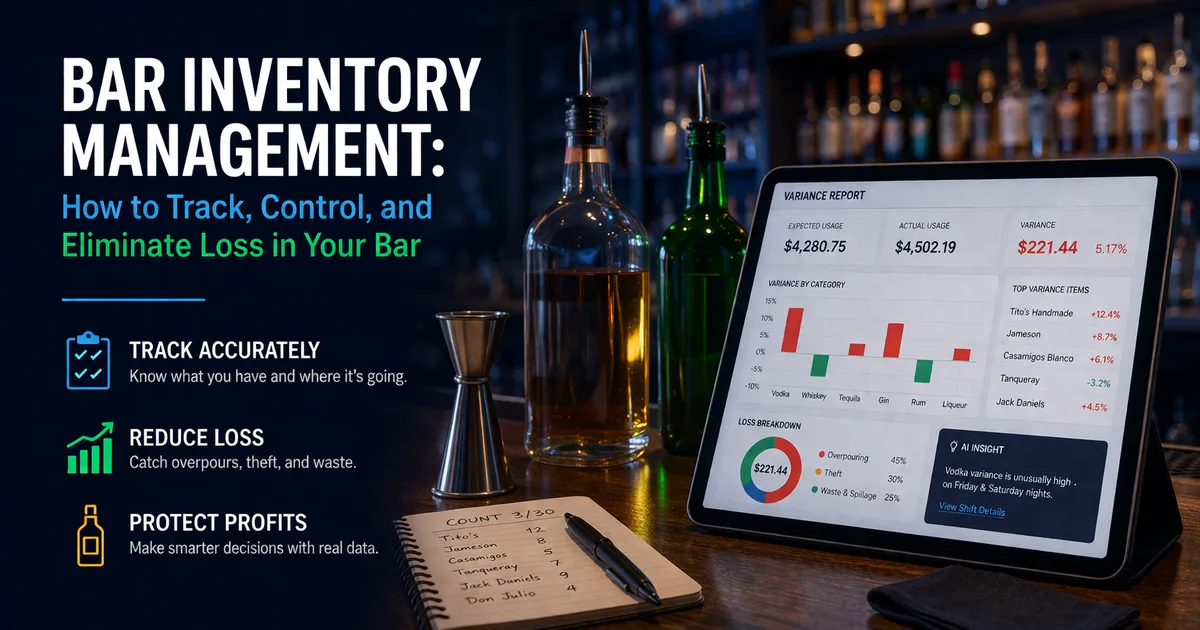
Most bar owners don't actually know how much inventory they're losing. This guide covers the fundamentals, and when you are ready to choose a tool, compare the best bar inventory management software.
Not because they don't care, but because tracking it manually is slow, inconsistent, and easy to get wrong.
The reality is simple: if you're not tracking your inventory properly, you are losing money every single night.
A proper inventory system should sit inside the broader operating picture. The National Restaurant Association's 2026 industry report highlights the pressure operators face, while Toast's PMIX reporting documentation shows how detailed sales data can support inventory review.
What Is Bar Inventory Management?
Bar inventory management is the process of tracking what you have in stock, what you're selling, what should be left, and what actually is left.
The gap between "what should be there" and "what's actually there" is where loss happens. This includes overpouring, spillage, theft, and incorrect counts.
Why Most Bars Struggle With Inventory Tracking
Traditional inventory systems rely on manual counts, spreadsheets, and guesswork. That creates problems like inconsistent counting times, human error, and no real connection to sales data, which means you can't answer the most important question: where is my money actually going?
How to Track Bar Inventory the Right Way
Modern inventory tracking connects three things: inventory counts, sales data, and recipes. When these are connected, you can calculate expected usage vs. actual usage, and that gap is exactly what a proper bar inventory tracking system is designed to surface.
Step-by-Step: How to Track Bar Inventory
1. Set Up Your Inventory Items
Add all bottles, kegs, and ingredients into your system with accurate units and categories. BarGuard lets you add items manually, bulk import via CSV, or auto-categorize your full inventory list using AI, so setup takes minutes, not hours.
2. Track Your Stock Levels
You need accurate counts of what you physically have. This can be done by manual entry, barcode scanning, or CSV uploads. Each count is timestamped so you always know when it was recorded and can compare count cycles accurately.
3. Connect Sales Data
Your POS system tells you what was sold, and that data drives expected usage. BarGuard integrates directly with Square, Clover, Toast, and other major POS systems. Without this connection, your variance numbers are always just estimates, and patterns like bartender theft remain invisible.
4. Build Recipes for Your Drinks
Each drink needs a recipe that defines ingredients and quantities. This allows the system to calculate how much inventory should have been used based on what was actually sold. No recipes means no theoretical usage, and no way to calculate variance.
5. Run a Variance Calculation
This is where everything comes together. BarGuard compares expected usage (from sales and recipes) vs. actual usage (from inventory counts) and shows you overpours, missing inventory, and estimated dollar loss, by item, by category, by shift. Learn more about how bar inventory variance is calculated and what thresholds to flag.
Where Bars Lose the Most Money
Once you start tracking properly, patterns become obvious. The biggest sources of loss are:
- ▸<a href="/blog/what-is-overpouring">Overpouring</a>, bartenders giving away extra alcohol without realizing it. A quarter ounce over per drink adds up to hundreds of dollars on a busy Saturday night.
- ▸<a href="/blog/bartender-theft-signs-prevention">Theft</a>, untracked drinks, free pours, or inventory disappearing. Internal theft accounts for 35 to 40% of all bar shrinkage.
- ▸Spillage and waste, poor processes and lack of accountability.
- ▸Inconsistent counts, irregular or inaccurate tracking that hides problems until they become expensive.
The Core Metrics You Need to Watch
Pour Cost Percentage
Pour cost is cost of goods sold divided by revenue. High-volume bars should aim for 18 to 22% on spirits. If yours is consistently above 25%, something is leaking, and variance tracking will tell you where.
Variance Rate
Variance is the gap between theoretical usage and actual usage. A 5% variance on a high-volume item is a signal. A 20% variance is a crisis. Track this weekly per category, not as a single blended number.
Reorder Points
Running out of your top spirits on a Saturday night is an operational failure. Reorder points, set based on actual usage rate and distributor lead time, prevent it. A good system flags these automatically.
Common Inventory Mistakes Bar Owners Make
- ▸Counting only spirits and ignoring beer, wine, and food items.
- ▸Letting the same person who pours the drinks also count the inventory.
- ▸Counting too infrequently. Monthly counts hide problems that weekly counts would catch.
- ▸Having no standard drink recipes, making theoretical usage impossible to calculate.
- ▸Not reconciling purchases: if received quantities aren't recorded, counts will always look off.
- ▸Treating variances as a curiosity instead of a management signal.
Manual vs. Software: What's Worth It?
A spreadsheet can technically track inventory. The problem is that spreadsheets are slow, error-prone, and don't connect to your POS, which means theoretical usage has to be calculated by hand, every single cycle.
A dedicated system like BarGuard automates the comparison between your counts and your sales data, flags variances instantly, and gives you reporting that's actually actionable. For any bar doing more than $10,000 a month in liquor sales, the loss-detection value alone almost always outweighs the cost. See our plans starting at $129/month.
The Bottom Line
If you're not tracking your inventory properly, you are losing money. Not sometimes, every day. The difference between profitable bars and struggling ones is simple: they know their numbers.
Ready to start? See exactly how to track bar inventory step-by-step, learn how to reduce your liquor cost percentage, read the complete bar loss prevention guide, or see how BarGuard works and start your free trial.
The Bar Inventory Management System Every Owner Needs
A strong bar inventory management system is not one spreadsheet, one count sheet, or one manager who is good at remembering what came in. It is a repeatable operating system that connects purchasing, receiving, storage, recipes, counts, sales, and variance review. When any one of those pieces is missing, the numbers may look organized, but they do not protect profit.
If you are building that structure from scratch, use the bar inventory system setup guide to organize items, vendors, purchase orders, receiving, waste logs, recipes, and variance before you rely on the weekly count.
Think of inventory management as a weekly control loop. Product comes in through invoices. Product leaves through recipes, pours, waste, comps, spills, transfers, and theft. Your job is to make every movement either expected, recorded, or investigated. The bars that win are not the bars that count the most often. They are the bars that turn each count into a decision.
- ▸Purchasing control: know what was ordered, what arrived, what it cost, and whether the invoice matches the delivery.
- ▸Storage control: know where product lives so counts are complete and managers do not miss back-stock, event storage, or satellite bars.
- ▸Recipe control: know how much each menu item should remove from inventory when it sells.
- ▸Count control: count the same items, in the same order, with the same partial-bottle method every cycle.
- ▸Variance control: compare expected usage against actual usage and sort issues by dollar impact, not by gut feeling.
That last point is where most operators fall short. They count inventory, then stop. A count tells you what is left. Bar inventory management tells you whether what is left makes sense.
Build Your Inventory Around How the Bar Actually Operates
The easiest inventory system to maintain is the one that mirrors the physical bar. Do not build your item list around a generic template and force your team to adapt. Build it around the way people move through your building. If the well vodka is on the speed rail, the count sheet should list it near the other well products. If premium tequila lives in locked storage until service, that location should be clear in the item record.
Start with zones: front bar, back bar, walk-in, keg cooler, liquor cage, event storage, office, patio bar, and any off-site storage. Then assign each item to its primary location. If a product appears in more than one place, decide whether your process needs separate location counts or one combined total. High-value products usually deserve location-level tracking because it helps isolate where loss is happening.
- ▸Use shelf order for count lists so counters move once through each zone.
- ▸Separate sealed inventory from open bottles so partial estimates do not slow down full-unit counts.
- ▸Tag products that are used in high-volume cocktails so recipe accuracy is checked more often.
- ▸Flag premium spirits, allocated bottles, and high-theft-risk items for weekly review even if the rest of the bar is counted less often.
This practical setup matters because inventory systems fail when they depend on memory. If a new manager can follow the count order without asking where items are hiding, the system is teachable. If only one person understands it, it is not a system yet.
Receiving and Purchase Control: Where Accurate Inventory Starts
Inventory accuracy starts before the bottle reaches the shelf. If invoices are missing, late, entered under the wrong item name, or recorded after the count, your variance report will be wrong. Many bars blame theft or over-pouring when the real issue is a delivery that was received but never entered.
Create a receiving rule that every delivery is checked against the invoice before it is stored. The person receiving should confirm item, size, quantity, unit cost, credit memos, and broken or shorted items. If a distributor substitutes a different bottle size or brand, log the substitute as the actual product received. Do not let it sit under the old item name because that creates fake usage later.
- 1Check every case and bottle against the invoice before signing.
- 2Record damaged, missing, or substituted products immediately.
- 3Enter purchases before the next inventory count is finalized.
- 4Match invoice item names to your inventory item names so reporting does not split one product into two rows.
- 5Review price changes monthly because rising bottle costs can make pour cost look worse even when usage is clean.
This is also where connected systems beat manual systems. A spreadsheet can track purchases, but it relies on someone entering every delivery perfectly. BarGuard keeps the purchasing, count, and variance workflow tied together so managers are not rebuilding the same truth from invoices, POS exports, and old sheets every week.
Recipe Management Is the Difference Between Counting and Controlling
Recipes are the bridge between your POS and your shelves. Without recipes, your POS can tell you that 80 margaritas sold, but it cannot tell you how much tequila, triple sec, lime juice, agave, and salt should have been used. That means you can calculate sales, but not expected usage. Expected usage is the number that makes variance real.
Every menu item that uses inventory should have a recipe. Start with the top sellers first because they create the biggest dollar swings. If your top ten cocktails account for most of your liquor movement, recipe accuracy on those drinks matters more than perfecting every slow-moving special on day one.
- ▸Use measured ounces for spirits, liqueurs, syrups, juices, and batched ingredients across every count cycle.
- ▸Include modifiers that change pours, such as doubles, rocks pours, premium substitutions, and 86ed ingredients.
- ▸Audit recipes any time the menu changes, glassware changes, or bartenders adjust specs during service.
- ▸Keep batch recipes tied to the underlying ingredients instead of treating the batch as a mystery product.
A common mistake is setting recipes once and never reviewing them. If bartenders are actually pouring 2 ounces but the recipe says 1.5, your variance report will scream theft even though the real problem is the recipe. That is why the best bar inventory management process includes recipe audits, not just counts.
How Often Should You Count Bar Inventory?
There is no single perfect count schedule for every bar. The right cadence depends on volume, risk, staffing, and how quickly you need to catch problems. A neighborhood bar with a small menu may not need the same count rhythm as a nightclub moving premium spirits at high speed. The mistake is treating every category the same.
- ▸High-value spirits: count weekly, and count more often if variance is active.
- ▸Well spirits and top cocktail ingredients: count weekly because small over-pours compound quickly.
- ▸Draft beer and kegs: count one to three times per week in high-volume programs.
- ▸Wine: count weekly for bottle programs, more often for by-the-glass programs with high waste risk.
- ▸Mixers, juices, syrups, and garnish: track by purchase and audit regularly so cocktail costs stay honest.
Cycle counting can help when a full weekly count is too heavy. Instead of counting every item every time, count the highest-risk categories weekly and rotate lower-risk categories on a slower schedule. The important thing is that the cadence is intentional, documented, and tied to variance review. Random counting creates random confidence.
How to Read a Bar Inventory Variance Report
A useful variance report should answer four questions fast: what item is off, how far off is it, what is the dollar impact, and when did the pattern start? Percent variance matters, but dollar impact matters more. A 20% variance on a slow-moving syrup may be less urgent than a 4% variance on a top-selling tequila.
Review variance in layers. Start with the biggest dollar losses. Then look at repeat offenders. Then compare categories. If one bartender shift has repeated tequila variance and another shift does not, the problem is probably behavioral or procedural. If every shift shows the same variance on the same cocktail ingredient, the problem may be recipe accuracy, glassware, jigger use, or batch prep.
- 1Sort by dollar impact first so managers investigate the most expensive problems.
- 2Separate one-time spikes from repeated patterns across multiple count cycles.
- 3Compare actual usage to POS sales and recipe depletion before making accusations.
- 4Check purchases and transfers before assuming product disappeared.
- 5Document the action taken so the next count can confirm whether the fix worked.
A Weekly Bar Inventory Workflow You Can Actually Maintain
The best workflow is boring in the right way. It happens at the same time, follows the same order, and produces the same review packet every week. That consistency is what gives owners confidence that a number changed because the bar changed, not because the process changed.
- 1Before the count: enter all purchases, close open transfers, and freeze receiving until the count is done.
- 2During the count: count by zone, use the same partial-bottle method, and record unusual waste or broken bottles.
- 3After the count: review high-dollar variance, check purchase timing, and compare recipes against POS sales.
- 4Manager review: assign follow-up actions for the top three issues, not every tiny variance.
- 5Next cycle: confirm whether the variance improved after the action was taken.
This is the kind of rhythm BarGuard is designed to support. Instead of counting, exporting reports, manually calculating recipe usage, and trying to remember what happened three shifts ago, the system connects the pieces so the review starts with the answers managers need most.
What Good Inventory Management Looks Like in Practice
In practice, a well-run bar does not wait until month end to find out inventory is off. The manager can look at the current week and see which products are driving the problem. If Casamigos Blanco is off by six bottles but the rest of tequila is clean, the investigation is narrow. If every well spirit is high on actual usage, the issue may be free-pouring habits, jigger compliance, or drink specs that do not match the recipes in the system.
This is also how owners separate operational mistakes from behavior problems. A missing invoice, bad recipe, or incorrect bottle size is fixed with process. Repeated high-dollar variance on the same shift needs coaching, review, or tighter controls. The numbers should help you respond proportionally instead of guessing who or what caused the loss.
Monthly owner review
Once a month, review the bigger trends: total pour cost, shrinkage by category, highest-loss products, fastest movers, dead stock, supplier price changes, and products that keep showing variance. This is where inventory management becomes strategy. You may discover that one cocktail is popular but unprofitable, one bottle is getting over-poured every weekend, or one supplier price increase has quietly changed your margins.
- ▸Top five products by sales volume.
- ▸Top five products by variance dollars.
- ▸Products with repeated variance across three or more cycles.
- ▸Products below par during peak service windows.
- ▸Products with price increases that require menu or recipe review.
Those reviews do not need to be long. A focused 20-minute review each month can protect more profit than a long count that nobody analyzes. Inventory management is only valuable when the numbers change what the bar does next.
Bar Inventory Management KPIs to Track Every Week
Once the process is stable, keep the weekly scorecard simple. Track total inventory value, purchases, actual usage, expected usage, variance dollars, pour cost, and the three products that created the most loss. Those numbers show whether the bar is improving, drifting, or hiding a new problem. They also give owners a common language with managers: not "inventory feels off," but "well tequila is 9% over expected for the second week and represents $420 in variance."
The KPI review should end with one action per major issue. Change a recipe, retrain a pour, check a storage key, update an item cost, or adjust par levels. If the report does not lead to action, the team will treat inventory as paperwork. If it leads to fast fixes, the team learns that accurate counts protect hours, margin, and trust.
For owners, that weekly discipline is the difference between knowing and hoping. You do not need a perfect operation to start. You need a process that makes loss visible, gives managers a clear next step, and improves a little every count cycle. That is the heart of bar inventory management: better numbers, faster decisions, and fewer expensive surprises hiding on the shelf every single week without guesswork or panic.
BarGuard Catches What You Can't See
Connect your POS, count your inventory, and let BarGuard show you exactly where the gaps are, automatically, every week.