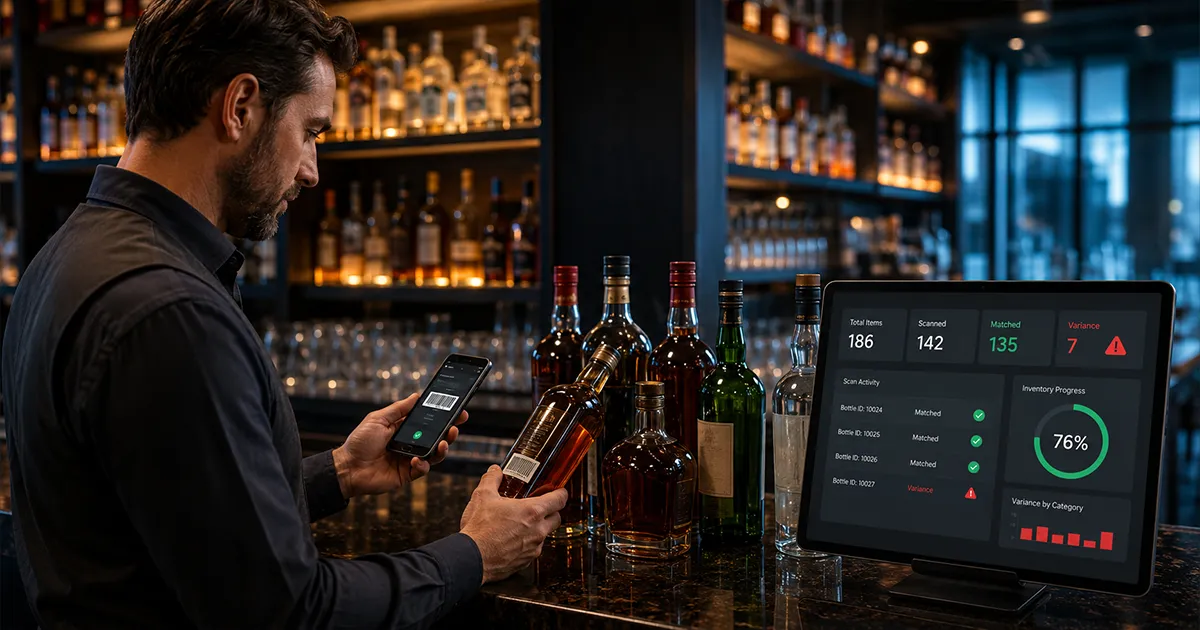
A liquor inventory scanner app sounds like the obvious fix for slow bar inventory. Point the phone at the bottle, scan the item, enter the count, and move on. Compared with paper sheets, messy spreadsheets, and handwritten bottle lists, that is a huge improvement. Faster counts matter because the inventory process only works if your team can actually finish it every week.
But scanning bottles is only the first step. A scanner can help you identify products and capture counts faster. It cannot, by itself, tell you whether the bottle usage matched what your POS says you sold. The real value comes when scanned counts connect to purchases, recipes, sales, and variance reporting. That is how a bar moves from faster counting to actual loss detection. That connection is what a liquor inventory system adds on top of the scanning itself.
Scanning only helps if the count can be compared with real sales activity. Toast's analytics and reports documentation shows how POS reports organize menu, sales, labor, discounts, voids, and waste data that scanner workflows need for follow-up.
What Is a Liquor Inventory Scanner App?
A liquor inventory scanner app is software that helps bars identify, count, and record liquor inventory using a phone, tablet, barcode scanner, camera, or connected scale. The goal is to make inventory faster and less error-prone than paper counts. Instead of searching through a long spreadsheet, the team can scan or select an item, enter the quantity, and move to the next bottle.
The best scanner workflow also keeps counts tied to the correct product record. That matters because a single bottle can show up under several names: Tito's, Tito's Vodka, Tito's 1L, Tito's Handmade Vodka, or whatever the distributor invoice calls it. If the scanner helps standardize item names, your reports become much cleaner.
- ▸Identify liquor bottles, beer, wine, mixers, and supplies faster.
- ▸Record full bottles, partial bottles, cases, kegs, and storage locations.
- ▸Reduce duplicate item names that make variance reports hard to trust.
- ▸Create a count history managers can compare week over week.
- ▸Speed up the physical count so inventory review happens consistently.
Barcode Scanning vs Photo Scanning vs Scale-Based Counting
Not every liquor inventory scanner app works the same way. Some rely on barcode scanning. Some use a camera photo to estimate bottle level or read labels. Some connect to scales that weigh bottles and estimate remaining liquid. Others are mobile count apps that use scanning mainly to find the item faster before the user enters a quantity.
Each method has strengths and tradeoffs. Barcode scanning is fast when labels are clean and the barcode matches your item database. Photo scanning can be easier for partial bottles and visual workflows. Scale-based counting can be precise, but it usually requires hardware, setup, and bottle tare data. The right choice depends on whether your biggest problem is speed, accuracy, setup time, or variance control.
Barcode scanning
Barcode scanning is useful for quickly identifying sealed bottles, cans, packaged products, and items with consistent UPC data. It is especially helpful when adding new products to an inventory list or finding the right item during a count. The limitation is that barcode scanning identifies the product. It does not automatically know how much is left in an open bottle.
Photo scanning
Photo scanning uses the phone camera as part of the count workflow. Depending on the tool, it may help recognize labels, estimate fill level, capture shelf photos, or turn a count image into draft inventory data for review. This can reduce typing and make counts more natural for managers who already walk the bar with a phone.
Scale-based counting
Scale-based systems estimate partial bottles by weight. They can be accurate when the bottle data is configured correctly, but they add hardware and process. Staff have to place each bottle on the scale, make sure the correct item is selected, and keep the workflow moving. For some bars, that precision is worth it. For others, it slows the count too much.
Where Scanner Apps Save the Most Time
Scanner apps save the most time in the repetitive parts of inventory: finding items, reducing typing, moving through shelves in order, and preventing managers from rebuilding the same count sheet every week. They also help when multiple managers count because the workflow becomes more standardized. Everyone sees the same item list, location, and quantity format.
The time savings become obvious when the bar has a large back bar, multiple storage areas, event inventory, or a fast-changing product list. Searching for product names in a spreadsheet is slow. Scanning or tapping through a shelf-ordered list is faster and less frustrating.
- ▸Opening new products and matching them to the correct item record.
- ▸Moving shelf by shelf without jumping around a spreadsheet.
- ▸Capturing counts from front bar, back bar, walk-in, liquor room, and event storage.
- ▸Reducing typos in product names, bottle sizes, and count quantities.
- ▸Making weekly counts realistic enough that managers do not skip them.
That last point is important. A perfect inventory process that takes too long will fail. A scanner app is valuable when it makes the right process easier to repeat.
Where Scanner Apps Still Fall Short
The biggest mistake is assuming that a scanner app automatically creates inventory control. It does not. A scan can help record what is on the shelf. It does not explain why product moved. If the system does not connect counts to purchases, recipes, and POS sales, it may make the count faster while still leaving the expensive question unanswered: did inventory usage match sales?
Scanner apps can also struggle when item data is messy. If the same bourbon exists as three products, a scan may send counts to the wrong row. If bottle sizes are wrong, variance math will be wrong. If purchases are missing, actual usage will look inflated. If recipes are outdated, expected usage will be wrong. Scanning helps capture data, but the surrounding data still has to be clean.
- ▸A barcode identifies the product, not the amount left in an open bottle.
- ▸A photo may need manager review before the count is trusted.
- ▸Duplicate items can still break reporting if the catalog is not cleaned up.
- ▸Missing purchases can create false variance even with a perfect count.
- ▸Scanning alone does not show over-pouring, theft, waste, or unrecorded comps.
Why Partial Bottles Are the Hard Part
Partial bottles are where bar inventory gets messy. A sealed bottle is easy: one bottle. A half-full bottle requires a judgment. Is it 0.5, 0.6, or 0.65? Different managers may estimate differently. Bottle shapes make it harder because a tall narrow bottle and a wide-shouldered bottle do not deplete visually the same way.
This is why scanner apps need a clear partial-bottle workflow. Some bars estimate in tenths. Some estimate in quarters. Some use photos. Some use scales. The exact method matters less than consistency. If one manager counts in quarters and another counts in tenths, your week-over-week usage may reflect counting style instead of real inventory movement.
- 1Pick one partial-bottle method for the whole team.
- 2Use the same count timing every week.
- 3Train managers on how to handle unusual bottle shapes.
- 4Review high-value partial bottles more carefully than slow-moving low-cost items.
- 5Compare the next count against expected usage before assuming theft or over-pouring.
BarGuard's product direction is built around this reality: scanning should reduce the manual work of counting, but managers still need review, context, and variance math before taking action.
How Scanning Connects to Variance Tracking
The count is only one input. To calculate variance, you need opening inventory, purchases, closing inventory, recipes, and POS sales. The scanner helps capture closing inventory faster. Purchases explain what came in. Recipes explain what each menu item should use. POS sales explain what guests bought. Variance compares what should have been used against what was actually used.
That is where a liquor inventory scanner app becomes more than a counting tool. If scanned counts flow into a system that already knows purchases, recipes, and sales, the app can help identify the products with the biggest gaps. If scanned counts sit in isolation, managers still have to do the hard work manually.
- 1Scan or enter closing counts by item and location.
- 2Confirm all purchases and emergency buys are entered.
- 3Map recipes to the products each drink uses.
- 4Pull POS sales for the same count period.
- 5Compare actual usage to expected usage by item.
- 6Sort the results by dollar impact so managers review the most expensive gaps first.
For a deeper explanation of that math, read the guide to bar inventory variance. Scanner speed matters, but variance is what turns a fast count into a business decision.
Barcode Scanning Is Not the Same as Loss Detection
Barcode scanning can make inventory feel modern, but it does not automatically prevent loss. A bartender can over-pour all weekend and the barcode will still scan correctly. A bottle can be comped, wasted, or stolen, and the barcode still only identifies the product. The scanner does not know whether the movement was expected unless the system compares it to sales and recipes.
This distinction matters when evaluating software. A bar owner does not just need to know that the item is Casamigos Blanco. They need to know whether Casamigos usage was 18% over expected, whether that pattern repeats on Friday nights, and whether the dollar impact is worth immediate review. That is variance tracking, not barcode scanning.
What to Look For in a Liquor Inventory Scanner App
The right scanner app should make counts faster without creating a reporting dead end. Look for a workflow that supports your actual bar: partial bottles, multiple storage locations, purchase entry, recipe mapping, POS sales, and variance review. A scanner app that cannot connect to the rest of the inventory process may be a faster clipboard, not a complete system.
- ▸Mobile-friendly count screens that work behind a real bar.
- ▸Support for partial bottles, cases, kegs, wine, beer, mixers, and supplies.
- ▸Clean item catalog management to avoid duplicate bottle names.
- ▸Purchase and invoice tracking so deliveries do not create false variance.
- ▸Recipe depletion so cocktail sales translate into ingredient usage.
- ▸POS connection or sales import so expected usage is based on real sales.
- ▸Variance reports sorted by dollar impact, not just quantity differences.
- ▸Manager review steps before AI or scan results become final records.
The manager review step matters. AI and scanning should reduce typing, but the bar should still review draft counts, invoices, and item matches before they affect financial reports. Good software speeds up the work without hiding questionable data.
How to Set Up Scanner Counts the Right Way
A scanner app works best when the count process is organized before the first bottle is scanned. Start by cleaning the item catalog. Confirm product names, bottle sizes, categories, unit costs, storage locations, and vendor names. If the item list is messy, scanning will only make messy data move faster.
Then build the count around physical zones. Count the front bar, back bar, liquor room, walk-in, keg cooler, wine storage, event storage, and overflow shelves in the same order every time. A scanner should help the team move through the building in a repeatable pattern, not encourage random scanning wherever a bottle happens to be found.
- 1Clean duplicate product names before the first scanner count.
- 2Assign each item to a primary storage location or count zone.
- 3Decide whether partial bottles are counted in tenths, quarters, photos, or scale estimates.
- 4Enter all purchases before closing the count period.
- 5Review scan matches and draft counts before finalizing inventory.
This setup work is not busywork. It is what keeps scanner data trustworthy. A fast count with wrong item names, missing deliveries, or inconsistent partials will still produce bad variance. The goal is faster and cleaner, not just faster.
When a Spreadsheet Is Still Enough
Not every bar needs a scanner app immediately. If you have a small bottle list, one storage area, and one manager doing counts consistently, a spreadsheet can work as a starting point. The key is to count the same way every week and keep purchases clean. A spreadsheet becomes a problem when the process gets skipped because it is too slow or when the reports do not explain variance.
If you are still building the habit, start with the free bar inventory spreadsheet template. Once counting becomes consistent, you will know whether the next bottleneck is speed, purchase entry, recipe math, or variance review. That tells you whether scanner software is worth the move.
When a Scanner App Becomes Worth It
A scanner app becomes worth it when slow counts are causing missed counts, bad data, or delayed decisions. If managers avoid inventory because it takes too long, the bar loses visibility. If counts are rushed, variance reports cannot be trusted. If product names are inconsistent, the same bottle may appear in several places and hide the real usage pattern.
The value also increases when the bar has high-volume cocktails, expensive spirits, several storage locations, or multiple managers. The more movement there is, the more important it becomes to capture counts quickly and consistently. But again, speed is only half the story. The count has to feed the loss-control workflow.
- ▸Weekly counts are getting skipped because they take too long.
- ▸Managers disagree on partial-bottle estimates.
- ▸Duplicate product names make reports hard to trust.
- ▸High-value bottles show repeated variance.
- ▸Your team wants mobile counting instead of paper or spreadsheet entry.
- ▸You need counts to connect directly to purchases, sales, and recipes.
Where BarGuard Fits
BarGuard is built for bars that need scanner speed and variance context in the same workflow. It supports mobile stock counts, purchase scanning, POS-connected sales, recipes, reorder alerts, and variance reporting. The goal is not just to count bottles faster. The goal is to show where the count does not match what sales and recipes say should have happened.
That is why BarGuard treats scanning as part of a larger system. A photo count, bottle scan, or invoice scan should create a draft managers can review. Once approved, that data should connect to expected usage and actual usage. The final output should be a clear variance report that tells the owner what changed, what it costs, and what to review first.
- ▸Use scanning to reduce manual count and invoice entry.
- ▸Use POS sales and recipes to calculate what should have been used.
- ▸Use variance reports to find over-pouring, theft, waste, and bad recipe mapping.
- ▸Use dollar-impact sorting so managers fix the expensive gaps first.
If you want the app-level overview, start with BarGuard's bar inventory app. If you want the scanning workflow, review photo inventory scan. If you are comparing cost, read the bar inventory software pricing guide.
Bottom Line
A liquor inventory scanner app can absolutely make bar inventory faster. It can reduce typing, clean up item selection, and make weekly counts more realistic. But scanner speed is not the same as inventory control. The scanner only answers what was counted. The business still needs to know whether that count makes sense compared with purchases, recipes, and POS sales.
The best scanner app for a bar is not just the one that scans fastest. It is the one that turns scanned counts into variance insight. When the system can show what should have been used, what was actually used, and what the gap costs, the count becomes more than a task. It becomes a weekly profit-control habit.
BarGuard Catches What You Can't See
Connect your POS, count your inventory, and let BarGuard show you exactly where the gaps are, automatically, every week.