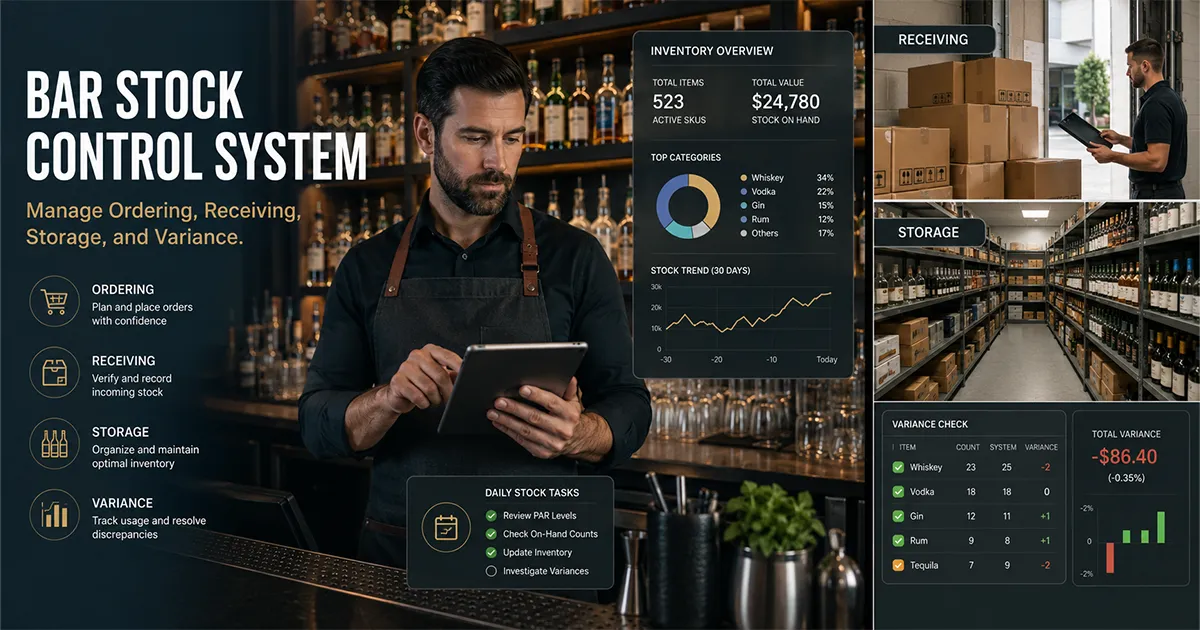
A bar stock control system is the operating process that keeps bottles, kegs, wine, mixers, garnishes, and back-stock moving through the business without quietly turning into waste, over-ordering, shrinkage, or missing product. It is more than a count sheet. A real system connects ordering, receiving, storage, service, waste logs, stock counts, recipes, POS sales, and inventory variance so managers can see what should be on hand and what actually happened.
Most bars do some pieces of stock control already. Someone places orders. Someone checks deliveries. Someone counts bottles. Someone notices when the well vodka runs low or when a keg kicks earlier than expected. The problem is that those actions often live in separate places: a notebook, a spreadsheet, the POS, a manager text thread, and a vendor invoice pile. When they are disconnected, the bar can be busy and still lose money every week.
This guide explains how to build a bar stock control system that actually works in service. You will see the control points that matter, the records every bar needs, how stock control differs from inventory management, and how to connect counts with purchases, waste, recipes, and sales. If your team is already counting but still cannot explain where product goes, pair this with the bar inventory reconciliation workflow.
Stock control also has a basic accounting foundation. The IRS explains in Publication 334 that beginning inventory, purchases, and ending inventory are core pieces of cost of goods sold. Bars use the same idea operationally, then add the details that matter during service: recipes, POS sales, waste, comps, transfers, and variance.
What Is a Bar Stock Control System?
A bar stock control system is the set of records, habits, and software that tells the bar what it has, what it needs, what came in, what went out, what should have been used, and what is missing. Good stock control keeps managers from making decisions based on the shelf alone. The shelf shows what is left. The system explains why.
For example, a bar may see that it has two bottles of tequila left and decide to order more. That is basic stock awareness. A stock control system goes further. It asks whether the current level is below par, whether a delivery is already scheduled, whether tequila usage matched margarita sales, whether waste explains part of the depletion, whether the recipe changed, and whether the same product has shown repeated variance.
That difference matters because many bars have enough product to keep service running but not enough control to protect margin. They order reactively, miss receiving errors, let slow-moving bottles tie up cash, and review loss after the month is already over. A practical stock control system gives managers a weekly rhythm instead of a monthly surprise.
Stock Control vs Inventory Management vs Variance
These terms overlap, but they are not the same. Bar inventory management is the broader discipline of tracking products from purchase through sale. Stock control is the day-to-day operating system that keeps the right amount of product on hand and documented. Variance is the gap between what should have been used and what was actually used.
A bar can have inventory management without strong stock control. It might count weekly but still miss deliveries, ignore par levels, or fail to log waste. A bar can also have stock control without meaningful variance if it only tracks quantity on hand and never compares usage to POS sales and recipes. The strongest system connects all three.
- ▸<strong>Inventory management</strong>: the full process of tracking products, costs, counts, purchases, recipes, and reporting.
- ▸<strong>Stock control</strong>: the operating controls that keep ordering, receiving, storage, service, and counts accurate.
- ▸<strong>Variance tracking</strong>: the expected-versus-actual comparison that shows whether product movement matched sales.
- ▸<strong>Reconciliation</strong>: the review that explains variance by checking purchases, transfers, waste, recipes, and counts.
If you want the full umbrella topic, read the bar inventory management guide. This article focuses on the stock-control layer: the controls that prevent bad data, over-ordering, waste, and unexplained loss from becoming normal.
The 4 Control Points Every Bar Needs
Every bar stock control system has four main control points: ordering, receiving, storage, and service. If one of those points is loose, the weekly count becomes harder to trust. If all four are documented, variance becomes much easier to investigate.
1. Ordering Control
Ordering control means deciding what to buy based on par levels, actual usage, upcoming demand, and vendor timing instead of gut feel. The manager should know which products are below reorder point, which are slow-moving, which prices changed, and which items are showing unexplained variance before placing the order.
The goal is not to keep shelves packed. The goal is to hold enough product to serve guests without trapping cash in bottles that do not move. A good ordering workflow uses the bar par levels and reorder points for each product, then adjusts for events, seasonality, menu changes, supplier lead time, and recent usage.
2. Receiving Control
Receiving control means checking what arrived against what was ordered and what was invoiced. This is where many stock problems begin. A vendor may short-ship a case, substitute a different bottle size, apply a credit, deliver damaged product, or change the unit price. If those details are not recorded, the stock count and cost numbers are wrong before service even starts.
The National Restaurant Association has written about how operators use technology to manage inventory and save money. Their article on restaurant inventory technology is not a BarGuard-specific source, but it reinforces the same practical point: better inventory records help operators control cost.
3. Storage Control
Storage control means every product has a clear home, clear access rules, and a countable location. Back bar shelves, liquor rooms, cages, walk-ins, keg coolers, patio bars, event stock, and office storage all need to be part of the system. If product moves between locations without a transfer record, one area looks short and another looks inflated.
Storage also affects waste. Bottles stored randomly get missed during counts. Kegs moved without notes create false depletion. Wine that is not rotated can spoil. Garnishes and mixers can expire unnoticed. The FDA's overview of food loss and waste is broader than bars, but the lesson still applies: product loss becomes easier to reduce when it is visible and documented.
4. Service Control
Service control is where the stock system meets the bar team. Recipes, pour sizes, comps, voids, remakes, spills, batch prep, and shift notes all affect product movement. If bartenders pour differently than the recipe says, expected usage becomes wrong. If managers comp drinks without a reason code, usage may look like shrinkage. If waste is cleaned up but not logged, the variance report loses context.
This is why stock control is not only a back-office process. It needs to fit service. A bar shift log template gives managers a place to capture the details that explain product movement while everyone still remembers what happened.
The Records a Bar Stock Control System Needs
A stock control system is only as strong as the records behind it. You do not need complicated paperwork, but you do need consistent records that feed the count and the variance report. The key is to capture the product movement that affects what should be on hand.
- ▸<strong>Item list</strong>: product name, category, size, unit, vendor, cost, par, reorder point, and storage location.
- ▸<strong>Purchase records</strong>: vendor, invoice number, delivery date, quantity, cost, credits, substitutions, and damaged items.
- ▸<strong>Transfer records</strong>: product moved between bars, storage rooms, events, or locations.
- ▸<strong>Waste and breakage logs</strong>: item, quantity, reason, shift, employee or manager, and approval.
- ▸<strong>Recipe records</strong>: ingredients, quantities, modifiers, batch yields, and current costs.
- ▸<strong>Count records</strong>: opening counts, closing counts, count method, location, timestamp, and counter.
- ▸<strong>Variance reports</strong>: expected usage, actual usage, unit variance, dollar variance, and likely explanation.
If you are starting from scratch, the bar inventory system setup guide walks through the same foundation in more detail. Stock control depends on clean item records. If one bottle is listed under three names, every count, purchase, recipe, and variance report becomes harder to trust.
How to Set Par Levels and Reorder Points
Par levels and reorder points are the difference between controlled ordering and panic ordering. Par level is the amount you want on hand to cover normal demand plus a buffer. Reorder point is the stock level that tells you it is time to buy before you run out. They are related, but they are not the same.
A simple starting formula is: Reorder Point = Average Daily Usage × Supplier Lead Time + Safety Stock. If a product moves quickly, has unreliable delivery, or is essential to a top-selling drink, it needs a higher buffer. If it is slow-moving, expensive, and easy to replace, the buffer can be smaller.
The mistake is setting par once and forgetting it. Menu changes, seasonality, events, supplier changes, and shifts in sales mix all affect usage. Review fast-moving products monthly and slow-moving products quarterly. If your top tequila doubles in usage after a new cocktail launch, the old par level is now a stockout risk.
How Stock Control Reduces Waste and Breakage
Waste and breakage are not always signs of bad staff. They are often signs of missing process. Bottles break. Draft beer foams. Cocktails get remade. Batches expire. Guests send drinks back. The stock-control question is whether those events are recorded well enough to explain inventory movement.
A useful bar waste log should capture item, quantity, reason, date, shift, employee or manager, and whether the entry should explain variance. If a bottle breaks and the log records it correctly, the variance report has context. If the same bottle is short with no note, managers are left guessing.
The best stock control systems do not only record waste. They review patterns. If the same product is wasted every weekend, the issue may be training, glassware, station setup, batch size, storage, or demand forecasting. The log is useful only when it leads to a change.
Weekly Stocktake Workflow for Bars
A weekly stocktake should be boring in the best way. Same time. Same method. Same locations. Same review steps. The more consistent the workflow, the easier it is to tell whether a discrepancy is real or just a count-quality problem.
- 1Close the count window and pause receiving or clearly mark anything that arrives during the count.
- 2Count each location in shelf order: front bar, back bar, coolers, storage, events, patio, and backup wells.
- 3Use one method for partial bottles, usually tenths or quarters, and document it.
- 4Confirm all invoices, credits, emergency purchases, and transfers are entered before review.
- 5Enter waste, breakage, comps, remakes, and shift notes before running variance.
- 6Compare actual usage against expected usage from POS sales and recipes.
- 7Sort discrepancies by dollar impact and assign next actions for the top items.
This workflow is where stock control connects to inventory reconciliation. The count tells you what is left. Reconciliation checks purchases, transfers, waste, recipes, sales, and variance so the manager can decide whether the gap is explained or needs follow-up.
How POS Sales and Recipes Expose Usage Gaps
Stock control becomes much stronger when it connects to POS sales and recipes. Counts and purchases tell you actual usage. POS sales and recipes tell you expected usage. The gap between those two numbers is where over-pouring, waste, theft, bad recipes, missing purchases, or count errors show up.
If the POS says you sold 100 margaritas and each margarita uses 2 oz of tequila, the expected tequila usage is 200 oz. If the count shows 260 oz disappeared after purchases and transfers are accounted for, the system has a 60 oz gap to explain. That does not automatically mean theft. It means the manager should check waste, recipe accuracy, comps, modifiers, pours, and shifts.
The GCMA's stock control guide is written for clubs rather than bars, but it reinforces a useful operating principle: stock control depends on repeatable records, stocktakes, and clear accountability. BarGuard applies the same discipline to bar-specific data like recipes, POS sales, variance, waste, and purchases.
Spreadsheet vs Software Stock Control
A spreadsheet can be a starting point for bar stock control. It can list products, record counts, track purchases, and calculate simple usage. For a small bar with a simple menu, that may be enough to build the habit. The problem is that spreadsheets become fragile as soon as the system needs recipe-linked expected usage, POS sales, vendor costs, waste context, and variance by item.
Spreadsheets also depend on clean manual entry. If someone forgets a delivery, changes an item name, pastes POS sales into the wrong tab, or records a case as a bottle, the report can point at the wrong problem. The math may still run, but the answer is only as good as the inputs.
Dedicated bar inventory software becomes useful when the stock-control workflow is too important to rebuild by hand every week. BarGuard connects stock counts, purchase scanning, vendor records, recipes, POS sales, waste context, reorder alerts, and variance reporting so managers can spend less time maintaining the report and more time acting on it.
How BarGuard Supports Bar Stock Control
BarGuard is built around the stock-control loop. You count products, scan or enter purchases, connect sales data, map recipes, record waste, and review variance. The system then shows which products are moving normally, which are below reorder point, which are losing margin, and which need investigation.
That matters because the real work of stock control is not just buying more product. It is deciding whether to reorder, investigate, adjust a recipe, update par, retrain a pour, check receiving, or record waste more consistently. BarGuard's bar inventory software features are designed to keep those decisions in one workflow instead of scattered across count sheets and memory.
If your bar already counts inventory but still has stockouts, emergency orders, unexplained variance, or slow-moving bottles tying up cash, the next step is stock control. Build the weekly rhythm: order from usage, receive against invoices, store by location, record waste, count consistently, and compare actual usage to expected usage. That is how inventory becomes a margin-control system instead of a shelf checklist.
Frequently Asked Questions
What is a bar stock control system?
A bar stock control system is the process and set of records used to manage ordering, receiving, storage, service, stock counts, waste, recipes, and variance. It helps managers know what should be on hand, what actually moved, and which discrepancies need action.
How is stock control different from inventory management?
Inventory management is the broader discipline of tracking product from purchase through sale. Stock control is the operating layer that keeps ordering, receiving, storage, service, and count records accurate enough for inventory decisions.
How often should a bar do stock control checks?
Most bars should review high-value and high-volume stock weekly. Fast-moving spirits, draft beer, and core cocktail ingredients may need more frequent spot checks, while slow-moving products can be reviewed less often.
What records are needed for bar stock control?
A bar needs item records, vendor and purchase records, receiving notes, transfer logs, waste and breakage logs, recipes, stock counts, par levels, reorder points, and variance reports to control stock reliably.
BarGuard Catches What You Can't See
Connect your POS, count your inventory, and let BarGuard show you exactly where the gaps are, automatically, every week.